
Property Tax Payment
(Step 1 of 6)Washington County accepts debit/credit cards and e-check/ACH transactions online. Convenience fee applies (see below). Washington County retains no portion of the convenience fee charged by the service provider.
Credit/Debit Card Payments
2.45% (minimum $1.50) Convenience Fee Applies
- Payment is non-refundable
- Only same day transactions may be voided or canceled during business hours

E-check/ACH Payments
$0.95 Convenience Fee Applies
- Payment is non-refundable
- Only same day transactions may be voided or canceled during business hours
- If paying by e-Check or ACH, please note our ACH Processor has changed. If a debit block is currently enabled on your account, please instruct your bank, prior to entering your information below, to allow incoming ACH debits from Company ID 0000079161. Do not insert blanks or hyphens between the numbers above.
Browser and Site Requirements
- A current version of Chrome, Firefox, Safari, or Edge is required on your desktop, laptop, or mobile device. Internet Explorer is not supported.
- Do not bookmark any part of this payment process except this first page.
- A browser refresh during the payment process will restart the process.
- This site uses cookies and JavaScript. Please have them enabled.
- Look for the Lock. Washington County has taken steps to ensure your transaction is secure. You should look for a small padlock icon in your browser, often in the address bar. If you do not see the lock anywhere, please use the technical support resources of your browser for assistance.
Online Payment Steps
The steps below describe the process for paying your property tax online.
Step 1: Read and understand this page. If you do not meet the technical requirements for using this site, you cannot make a payment online.
Step 2: Account Search. Look up your account number to obtain the balance and verify the ownership information as it should appear on the account.
Step 3: Account Verification. When you submit the
search, it will verify name and account balance.
(Accounts in foreclosure cannot pay online. Please contact
503-846-8801 for other payment options.)
Step 4: Payment Information Entry. Full or partial payments accepted. Please note that balances take 48 hours to update.
Step 5: Payment Confirmation. Please ensure your bank routing and account number are entered correctly. If an entry error occurs, loss of discount and interest may apply.
Step 6: Receipt. This is a record of the transaction. An email receipt will be sent to the email address you entered, but you may also print the Receipt webpage if you wish. If paying by e-check/ACH, please allow 7-10 business days to process. If you're unsure a payment was successful, please contact 503-846-8801 before making a second attempt.
To make a card or e-check payment, start by looking up your account.
Look Up Your Property Tax Account
(Step 2 of 6)There are four account types which can be accommodated online.
Examples are:
- P9090909 (Personal Property)
- M909090 (Manufactured)
- U909090 (Utility)
- R9090909 (Real Property)
Please enter your account number as it appears on your statement.
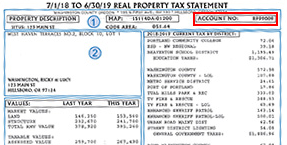
If you do not have your tax statement, you can retrieve another copy.
Property Tax Payment
Enter Payment
(Step 3 of 6)
Enter a full or partial payment amount for each account. To pay a balance in full, you can click the Pay full button. You can adjust the payment amount before clicking "Proceed to payment".
| Property ID | Account Owner | Amount Due | Fill payment amount | Payment Amount |
|---|---|---|---|---|
| Total | ||||
Payment Submitted
(Step 6 of 6)| Property ID | Account Owner | Amount Paid |
|---|---|---|
| Subtotal | ||
A receipt has been sent to the email address provided.